![LogoLarge.png]](https://kb.iriscx.com/hs-fs/hubfs/LogoLarge.png?height=31&name=LogoLarge.png)
What Is IrisCX for Salesforce?
IrisCX for Salesforce brings live, visual customer support directly into your Salesforce workflow. It allows teams to start secure IrisCX sessions from Salesforce records, instantly connecting Experts and customers without switching tools or breaking context.
The integration is designed for organizations that want to resolve issues faster, reduce repeat visits, and capture richer service insights — all while keeping Salesforce as the system of record.
Why Teams Use IrisCX with Salesforce
Resolve Issues Faster
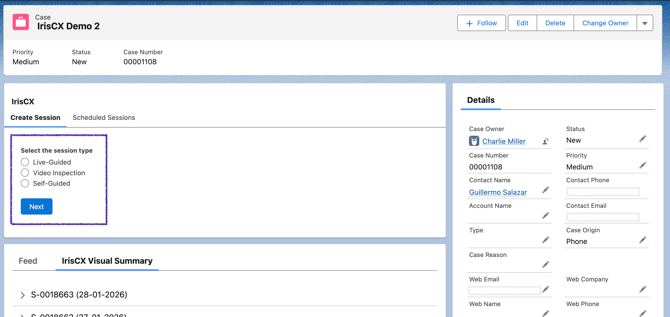
Launch IrisCX sessions directly from Salesforce records to connect technicians and customers in real time. Visual guidance helps identify problems quickly and reduces back-and-forth communication.
Keep Workflows in One Place
Everything happens inside Salesforce:
-
Sessions are started from records
-
Session data is automatically saved
-
Summaries live alongside customer and case information
No extra tabs. No manual logging.
Improve First-Visit Resolution
By seeing what the customer sees, technicians can:
-
Diagnose issues accurately
-
Provide clearer guidance
-
Avoid unnecessary follow-ups or site visits
This leads to higher first-visit resolution and lower operational costs.
Create a Better Customer Experience
Customers don’t need to download an app or create an account. They receive a simple SMS link and join instantly, making the experience:
-
Fast
-
Frictionless
-
Easy to understand
Capture Rich Session Insights
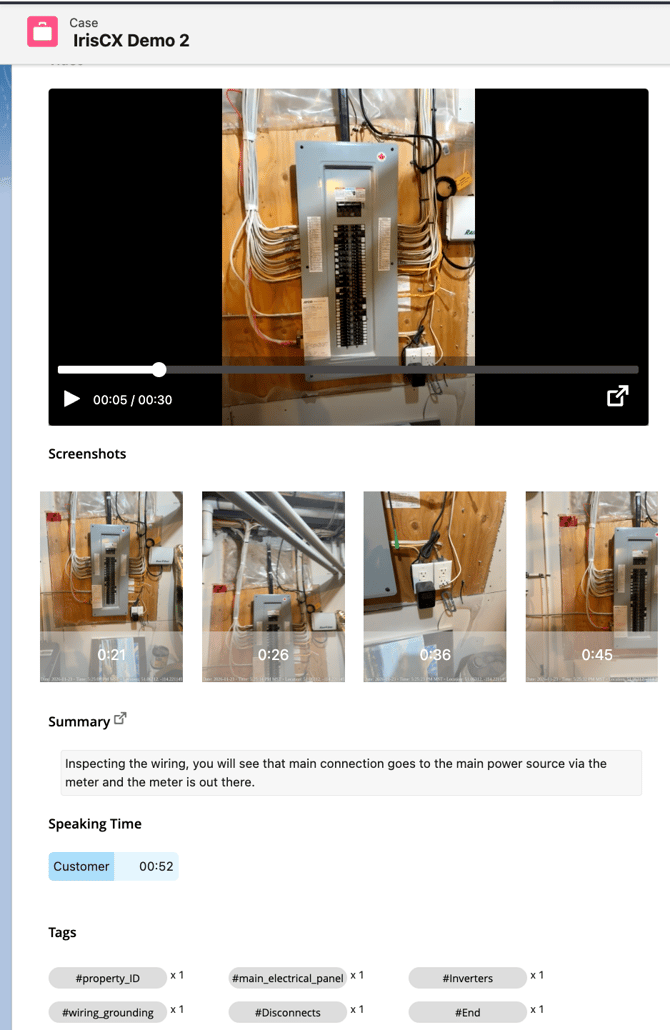
Every IrisCX session populates a Salesforce record that can include:
-
Session summaries
-
Screenshots
-
Video recording previews
-
Speaking time and metadata
This gives teams valuable context for quality assurance, training, and continuous improvement.
Flexible Across Salesforce Objects
IrisCX can be used across:
-
Contacts
-
Leads
-
Cases
-
Work Orders
-
Custom objects
This makes it adaptable for sales, service, field operations, and support teams alike.
Typical Use Cases
-
Customer Support: Visually troubleshoot issues during live cases
-
Field Services: Prepare technicians before on-site visits
-
Energy & Utilities: Verify installations or audits remotely
-
Sales & Onboarding: Walk customers through sales and setup
How It Fits Into Your Tech Stack
IrisCX enhances Salesforce rather than replacing existing processes. Salesforce remains the system of record, while IrisCX adds a visual engagement layer that improves understanding, speed, and outcomes.